The spreadsheet is always behind
Deductions and refunds recorded "later" mean balances that never match what clients actually paid.
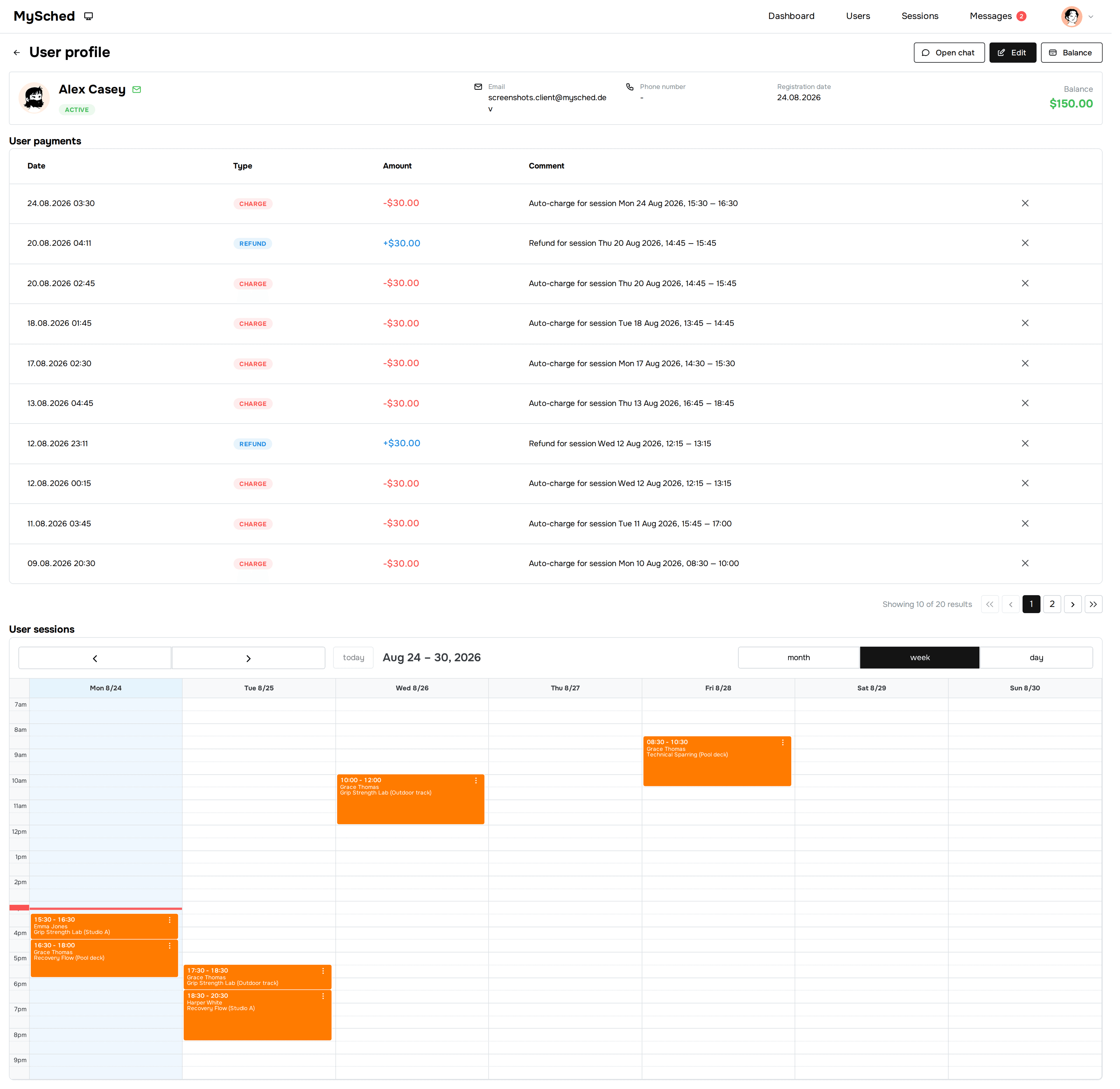
See each client balance, which session price was deducted, what was refunded, and who needs attention.
You choose the reminder and balance deduction times. Messages are shortened in this example.
Sound familiar?
Deductions and refunds recorded "later" mean balances that never match what clients actually paid.
A cancelled session without a recorded refund or carried-over lesson erodes trust on both sides.
Without history you cannot show a parent exactly when session prices were deducted and what remains.
When balances live in the owner's notebook, no admin or coach can answer a simple billing question.
How it works
Schedule, prepaid balances, and reminders without spreadsheets or chats. More time for your clients.
Record a payment or lesson pack in the client card.
MySched deducts lesson prices from balances according to company settings.
Owner and admin see deductions, refunds, and remaining balances.
Core features
Remaining amount and operation history near the client.

The system deducts the lesson price before the lesson starts.
Track revenue trends, top clients, and breakdowns by session type from your dashboard.


From chats to one schedule
“Before MySched, my evenings were chats, payments, reschedules, and checking client balances. Now I open one place and see the week, the balances, and the changes I need to handle. That saves me more than 10 hours a week.”
Pricing
One subscription per company, not per client.
FAQ
Not as the current core offer. The focus is balance, balance deduction, and refund tracking.
Yes. A pass can be managed through client balance and deducted from the balance over time.
No. MySched helps operationally track client balances and lessons, but it is not accounting or fiscal software.
If the session price was already deducted, MySched automatically refunds the client balance and records the operation in history.
MySched offers simple, predictable plans per company without per-client fees: Solo is $49/mo and Small Team is $149/mo, with a free plan to get started.
Most teams enter clients and starting balances within a day — top up each balance with what the client actually has left.
Client balance software tracks prepaid money and lesson packs per client: top-ups, automatic session-price deductions before each session, refunds on cancellation, and full operation history. It answers the three questions every coach and studio owner asks daily — who has paid, who is running out, and who owes — without a spreadsheet.